
September 15, 2026
This release introduces display conditions and custom validation for table columns in Edit Row forms, adds row-level context for formulas, and expands OAuth integration capabilities. It also includes usability improvements, bug fixes, and overall platform stability updates.
Release Details
Edit Row Enhancements for Tables
The form-based Edit Row experience for Table variables now provides more control over how columns are displayed and validated. Display conditions and custom validation can be configured individually for table columns, giving users greater flexibility when editing table data.
You can configure these settings for Table variables in Lending Setup.
Column Display Conditions
Display conditions can now be configured for individual table columns and apply specifically to the Edit Row form. A display condition determines whether a column is shown when editing a row (in the form), but does not affect how columns are displayed in the main Table view.
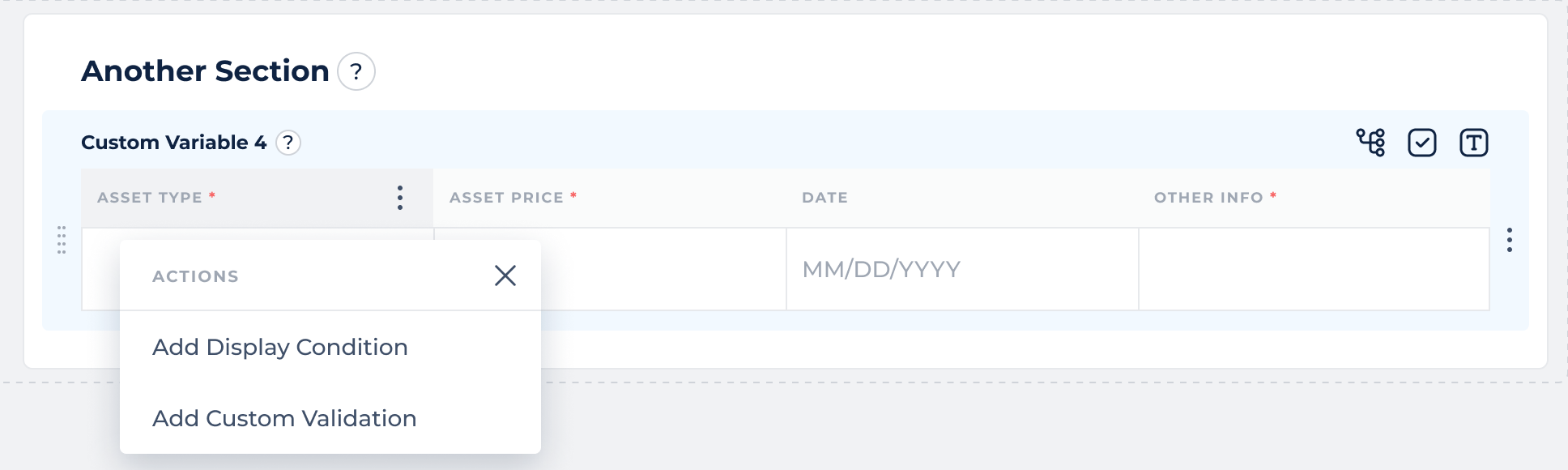
To configure a display condition, hover over a table column header to access the three-dot menu, then select Add Display Condition or Edit Display Condition. The display condition is configured in a modal using the same approach as display conditions for other variables.
Column Custom Validation
Custom validation can also be configured for individual table columns and applies specifically to the Edit Row form. A custom validation rule determines whether the value entered for a column is valid when editing a row (in form), but does not impact the main Table view.
To configure custom validation, hover over a table column header to access the three-dot menu, then select Add Custom Validation or Edit Custom Validation. You can define a validation condition and a custom error message that is displayed when the condition is not met.
When a validation condition fails, the configured error message is displayed and the changes cannot be applied until the issue is resolved.
Row Context in Formulas
When configuring display conditions or custom validation for a table column, you can use the $current_row_context system field to reference values from the row currently being edited.
For example, the following formula checks whether the annual_income value in the current row is between 10,000 and 100,000:
RANGE($current_row_context.annual_income, 10000, 100000)
The following formula checks whether the borrower_states Multi-Select List in the current row does not contain Alabama:
NINCLUDES("Alabama", $current_row_context.borrower_states.items)
The $current_row_context field is available specifically for formulas used in column display conditions and custom validation within the Edit Row form.
Document Naming Updates
The naming format for generated and signed documents now includes the application display ID, making these documents easier to identify.
- Generated documents:
{Template Name} - {application_display_id}.pdf - PandaDoc and DocuSign signed documents: Signed:
Signed: {Template Name} - {envelopeId} - {application_display_id}.pdf
Expanded Authentication for Integrations
OAuth integrations now support authentication flows that combine Signed JWT and OAuth authentication.
With this flow, a Signed JWT is generated and included in the OAuth token request. The JWT is then exchanged for an OAuth access token, which is used for subsequent API requests.
The JWT can be injected into a configurable field in the OAuth request, allowing the authentication flow to support different integration requirements without relying on a fixed field name.
For example, you can configure this in Additional Configuration:
{ "oAuth": { "clientAssertionFieldPath": "client_assertion" } }
Then specify the corresponding field in the OAuth request:
{ "client_assertion_type": “urn:ietf:params:oauth:client-assertion-type:jwt-bearer” }